Custom software
Moving from Spreadsheets to a Custom Web App: When It's Time
Spreadsheets are excellent for thinking and a weak operating system. The trouble starts when a workbook stops being a personal analysis and starts running the business — orders, inventory, scheduling, quotes, or approvals. You are then asking a file to do the work of a multi-user application: roles, a single source of truth, validation, history, and integrations.
This guide helps you decide whether to move one operational workflow into a custom web app, and how to do it without a big-bang cutover. The screens and diagrams below were rendered for this article as examples, not as screenshots of a client system.
1. The signs you've outgrown spreadsheets
Six patterns show up again and again:
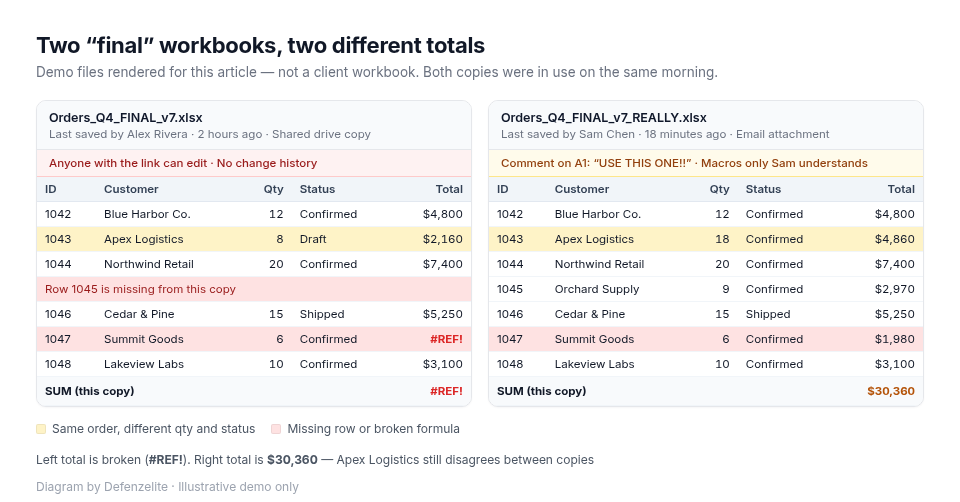
- Version conflicts. The team works in attachments named
Orders_FINAL_v7_REALLY.xlsx. Nobody is sure which file is current, and two people can "win" the same edit. - Manual copy-paste. The same order is retyped from email into the sheet, then into accounting, then into a weekly report. Every hop can drop a row.
- No access control or audit trail. The file is shared with "anyone with the link." You cannot say who changed a price last Tuesday.
- Formula errors and a single expert. One person understands the macros. When they are away, the process stalls. Errors hide in plain sight, so teams often feel more confident than the evidence supports. In a review of field audits, Raymond Panko found that later studies (1997 onward), using better methods, reported errors in 91% of 54 workbooks. Most of those audits only counted substantive errors.
- Slow, fragile files. The workbook takes minutes to open, or breaks when two people edit at once. Size alone is not a reason to rebuild; slowness plus daily operational use is.
- No automation or integrations. Status changes do not notify anyone. Reports need a Friday cleanup before anyone trusts them.
Any one of these is annoying. A cluster of them means the spreadsheet is carrying work it was not designed for.
2. A five-minute self-check scorecard
Score each statement 0 (no), 1 (sometimes), or 2 (yes, regularly).
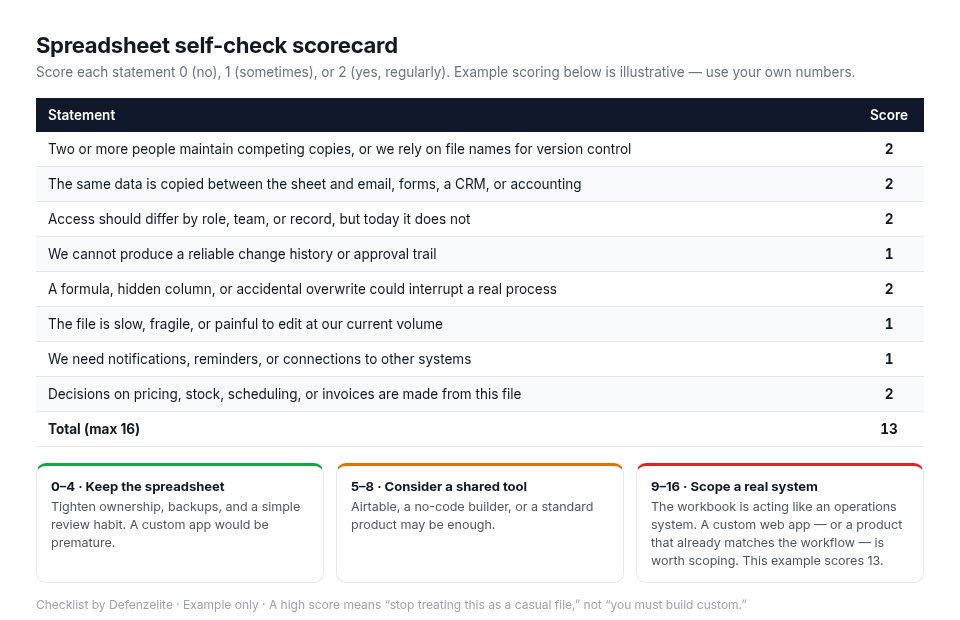
How to read the total (max 16):
- 0–4: Keep the spreadsheet. Tighten ownership, backups, and a simple review habit.
- 5–8: A shared tool such as Airtable, a no-code app, or a well-fitted off-the-shelf product may be enough.
- 9–16: The workbook is acting like an operations system. A custom web app — or a product that already matches the workflow — is worth scoping.
3. What a custom web app actually replaces
You are not recreating every tab and colour. You are replacing the jobs the spreadsheet was improvising:
- Roles and permissions. An ops manager can edit all orders; a salesperson sees only theirs; finance can export but not change prices.
- A single source of truth. There is one order record, not five emailed copies.
- Validation. You cannot save an order with a missing customer, a negative quantity, or a status skip the business does not allow.
- Dashboards that stay current. Filters, totals, and exceptions update as people work — no Friday cleanup.
- Automations and integrations. A status change can email the customer, create a task, or post to accounting through an API.
- An audit trail. You can see who changed what, and when.
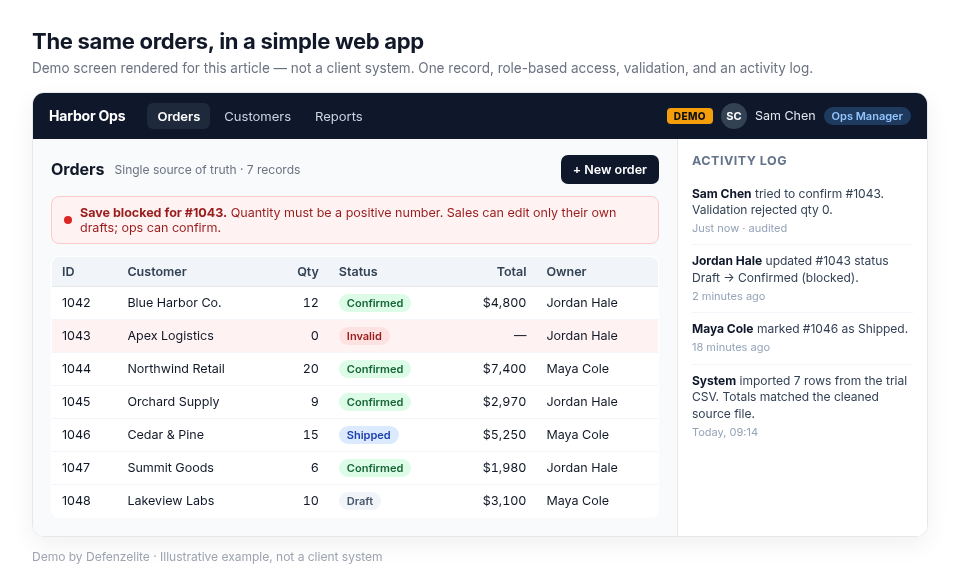
A good first app is narrower than the spreadsheet it replaces. Pick one workflow (for example, "intake to confirmed order") and do it properly.
4. A phased migration plan
Do not rebuild every sheet at once. Move one bounded workflow, prove it, then retire the old file.
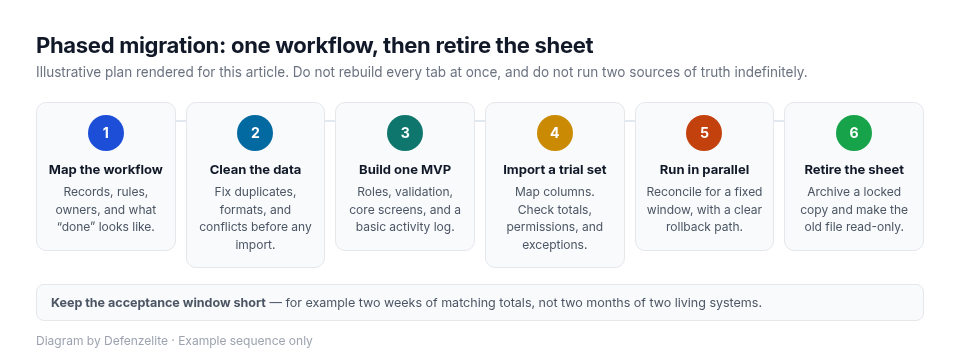
- Map the workflow. List records, rules, owners, and outputs. Separate source data from calculations, and write down what "done" looks like — for example, "a confirmed order is visible to ops and finance without a copy-paste step."
- Clean the data. Fix duplicates, mixed formats, broken formulas, and conflicts. Use stable IDs, not names, as keys. Do this before you import — it is usually the longest step.
- Build an MVP for one workflow. Roles, validation, core screens, and a basic activity log. Extra reports can wait.
- Import a trial set. Map columns. Users check totals, permissions, and known exceptions against the cleaned file.
- Run in parallel for a defined period. Agree who may change which system and how you roll back. Keep it short — two weeks of matching totals, not two months of two living systems.
- Retire the sheet. Archive a locked copy and make the old file read-only so it cannot quietly become the source of truth again.
5. When you should not switch (and lighter options)
A custom web app adds cost, training, and ongoing maintenance. Skip it when the work is temporary or changing week to week, when one person owns the file and can review every important change, when mistakes are easy to reverse, or when a standard process already has a solid off-the-shelf product (accounting, CRM, help desk).
Lighter options to try first:
- A better spreadsheet habit: one owned file, named ranges, data validation, a change-log tab, and backups you have actually restored.
- A structured tool such as Airtable or a no-code builder, if the workflow fits and you accept vendor limits, usage pricing, and lock-in.
- An off-the-shelf product, if the process is common and your team can adapt to it.
Choose custom when the workflow is specific, permissions and history matter, or you need integrations a platform cannot support cleanly. Off-the-shelf is often the better first buy for standard processes.
Practical takeaways
- Judge the process and the cost of errors, not the file size alone.
- A cluster of signs is a stronger signal than any single complaint.
- Replace jobs (roles, truth, validation, history), not tabs.
- Migrate one workflow. Clean data first. Run in parallel only for a fixed acceptance window.
- Keep spreadsheets for personal analysis; use a shared app when colleagues and other systems depend on the data.
Build a custom web app with Defenzelite
Defenzelite designs and builds custom web platforms and SaaS products for teams that have outgrown shared workbooks — starting with one operational workflow you can actually run.
👉 Talk through a spreadsheet-to-web-app plan at defenzelite.com, call +91 80851 22017, or email sales@defenzelite.com.
Sources
- Raymond R. Panko, "Spreadsheet Errors: What We Know. What We Think We Can Do," EuSpRIG 2000; arXiv:0802.3457: https://arxiv.org/abs/0802.3457
- European Spreadsheet Risk Interest Group, Research and Best Practice: https://eusprig.org/research-info/research-and-best-practice/